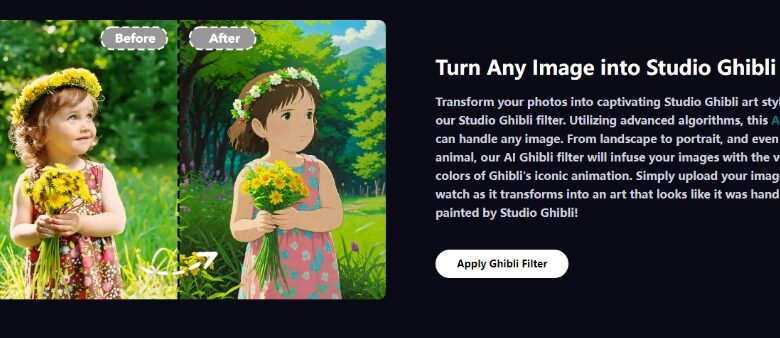
The enchanting worlds of Studio Ghibli, known for its iconic films like Spirited Away and My Neighbor Totoro, have captivated audiences for decades. Their vibrant colors, whimsical characters, and ethereal landscapes are instantly recognizable. Now, thanks to advancements in technology, you can bring that magic into your own photos with the Studio Ghibli filter.
What is the Studio Ghibli Filter?
The Studio Ghibli filter is a photo editing tool or feature that allows users to apply visual elements inspired by the unique animation style of Studio Ghibli. From dreamy backdrops to soft color palettes and detailed textures, this filter can transform everyday images into something reminiscent of the iconic art seen in Ghibli movies.
This filter is available across various apps, websites, and editing software, with SeaArt AI being one of the standout platforms offering Studio Ghibli-inspired effects. SeaArt AI combines cutting-edge AI technology with artistic creativity, enabling users to generate Ghibli-style imagery effortlessly.
How Does It Work?
Using the Ghibli filter, especially through platforms like SeaArt AI, is typically straightforward. Here’s a general process of how it works:
- Select Your Photo: Choose an image you want to transform. It could be a landscape, portrait, or everyday scene.
- Apply the Filter: Depending on the app or tool, select the Studio Ghibli filter. SeaArt AI’s version leverages AI algorithms to automatically apply artistic elements reminiscent of Ghibli animations.
- Fine-Tune: Some platforms, including SeaArt AI, allow for customization, where you can adjust saturation, brightness, and texture to match the exact mood you want to evoke.
- Save and Share: Once satisfied, save the image and share it with your friends, or post it on social media to give your photos a magical Ghibli touch.
Popular Uses of the Studio Ghibli Filter
- Landscapes: The filter works wonders with nature scenes, turning ordinary photos into dreamy vistas reminiscent of Princess Mononoke or Castle in the Sky. Forests, mountains, and rural settings gain a sense of wonder and serenity.
- Portraits: Enhance portraits by adding a soft, magical glow. Whether you want to feel like a character in Kiki’s Delivery Service or have a peaceful setting behind you like in Howl’s Moving Castle, this filter adds charm to personal images.
- Fan Art: Fans of Studio Ghibli can use this filter to create tributes to their favorite films. By applying the filter to their drawings or images through tools like SeaArt AI, fans can make their work look like it came straight from a Ghibli movie.
Conclusion
The Studio Ghibli filter is a wonderful way to add a touch of magic to your photos, bringing the timeless charm of Ghibli films to everyday scenes. Whether you’re an avid fan of the films or just appreciate the artistry behind them, this filter allows anyone to transform ordinary images into a whimsical masterpiece. With platforms like SeaArt AI offering Studio Ghibli-inspired effects, the creative possibilities are endless.
FAQs
1. Where can I find a Studio Ghibli filter?
You can find Studio Ghibli-inspired filters on various photo editing apps, such as Instagram, Snapchat, and specialized platforms like SeaArt AI.
2. Can I use the Studio Ghibli filter for videos?
Yes, many apps that offer filters for photos, including SeaArt AI, extend these features to video editing. You can apply the Studio Ghibli filter to your videos for a more dynamic and magical effect.
3. Is the Studio Ghibli filter free to use?
Some versions of the filter are free, while others may require in-app purchases or subscriptions depending on the platform or editing software.
4. Can I customize the filter?
Many platforms, including SeaArt AI, allow you to adjust the intensity and certain elements of the Studio Ghibli filter, such as color saturation, contrast, and brightness, to suit your preferences.
5. Will the filter work on all types of images?
While the filter enhances most images, it works best with photos that have natural elements like landscapes or soft lighting, as these align closely with the themes and aesthetics found in Ghibli films.